Codex Client Overview and Workspace Understanding
Understand Workspace project context, preprocess meeting minutes, and classify summary objects
1st session. Welcome to the Codex Client Overview and Workspace Understanding Session
Understand Workspace project context, preprocess meeting minutes, and classify summary objects
- Survey Purpose: Collect required participant information to issue personal AI Accounts for the bootcamp
- How to Participate: Scan the QR code on the right with your smartphone camera or access the link below.
- Survey Link: https://forms.gle/R8KDB9gbQKzdkgDs9
- Notice: Please complete the survey promptly to ensure your account is generated before the practical exercises.

- Survey Purpose: Understand participants' prior experience in AI & SW development and learning expectations
- How to Participate: Scan the QR code on the right with your smartphone camera or access the link below.
- Survey Link: https://forms.gle/M33mFEgMro7TPkbt6
- Notice: Survey results will be used solely for customized training and course effectiveness analysis.

- Survey Purpose: Measure learning outcomes, gather feedback on satisfaction, and reflect improvements for future courses
- How to Participate: Scan the QR code on the right with your smartphone camera or access the link below.
- Survey Link: https://forms.gle/7B8Ge3GexroPLQXeA
- Notice: Completing the satisfaction survey after training will greatly help us provide better programs in the future.

- Course Name: [ACE Startup SW/AI Pilot Course] Day 1. Codex Client-based requirements definition training course
- 1st session topic: Understanding Codex Client and Workspace (the first step to AI collaboration)
- Time plan (total 180 minutes):
- Introduction (30 minutes) – Opening the class and opening up your thoughts.
- Lab Description (30 minutes) - ChatGPT vs Codex Client differences and Workspace project concepts
- Practice progress (90 minutes) - Meeting minutes preprocessing and summary object classification practice
- Sharing and organizing (30 minutes) - Sharing and feedback on practice output
Opening Intro (EN)
Day 1 opening introduction lecture slide deck in English, covering 1-person unicorn company cases and lean AI-native company trends.
🚀 Open Slide Deck (EN)- Introduction questions: “What is the difference between rewriting a prompt to get a good answer from ChatGPT every time, and designing an agent?”
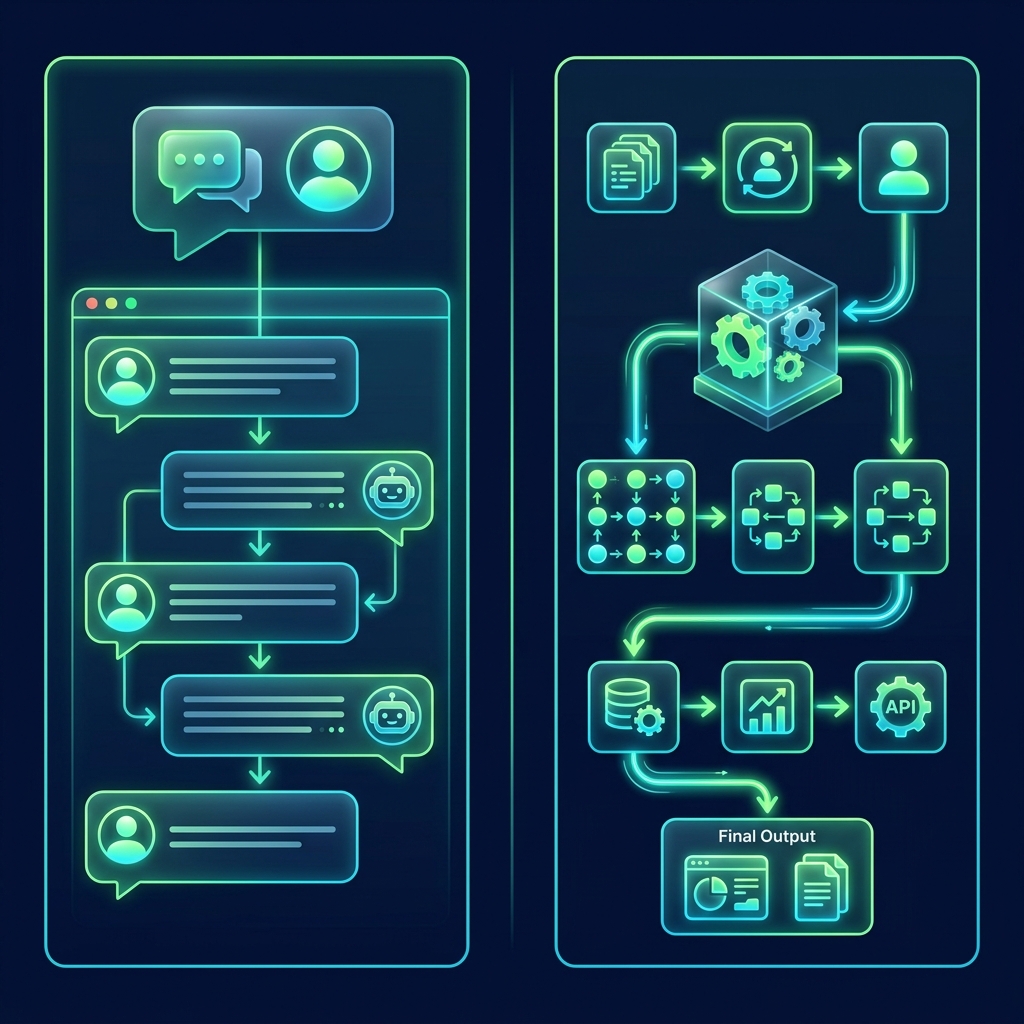
- Comparative analysis:
- ChatGPT Question: Asking one-off questions, improvising attempts to get answers, and relying on the individual's ability to write prompts.
- Codex Workspace: Relationship monitoring and context caching of multiple files, consistent specification design, and automation linkage pipeline formation.
| division | Step 0. Preprocessing of meeting minutes summary | Step 1. Planning element object classification |
|---|---|---|
| main purpose | Eliminate Saddam and Ping Pong conversations (noise filtering) | Cataloging refined information according to nature |
| Action performed | Extracting unstructured planning memos in the form of descriptive sentences within 15 lines | Separation of user roles, function candidates, business rules, and pending issues |
| output file | meeting-notes.md generation |
Four planning component object definitions |
automation Create folderautomation Folder registration- Lab Step 1: Create a meeting-notes-raw.md file
in the working folder
meeting-notes-raw.mdCreate a file and paste the expert consultation kick-off conversation log. - Lab Step 2: Sending preprocessing instruction prompt to AI window
Step 0 Summary Preprocessing Prompt (copyable)
Read the original meeting minutes from meeting-notes-raw.md, remove unnecessary conversation context and context between speakers, and write information about service users, functional requirements, system policies, and undecided reservations in the form of a compact, unstructured summary memo of about 15 lines. Please do not arbitrarily add fictitious content that is not in the original text.
- Expected deliverables:
meeting-notes.mdSummary files are automatically created and saved within your local folder.
Read meeting-notes.md and identify the following:
1. Service users
2. Functions performed by the user
3. Functions performed by the system
4. Business rules
5. Matters not yet decided

Do not add information that is not in the meeting notes and mark unclear information separately.
* Service users:
  - Customer (consultation reservation and payment)
  - Expert (check consultation schedule in real time)
  - Admin (performs expert approval policy)
* Business rule: Payment must be completed to confirm
* Indecision reservations:
  - Reservation completion notification channel (SMS/email)
  - Cancellation penalty and refund policy
- Planning inspection self-diagnosis guide:
- 1. **Role Definition**: Are users clearly divided into three entities: Customer, Expert, and Admin?
- 2. **Causal relationship**: Has the correlation between payment and reservation schedule approval been classified without omission?
- 3. **Pending Separation**: Are SMS/email notification pending matters and fee policies separated as pending matters?
- 4. **Anti-Hallucination**: Have virtual functions (point recharge, member withdrawal) that are not in the original chat log flowed into the AI analysis?
- Summary of Session 1:
- More questions about Workspace: Codex Client maps the entire local directory to the AI brain's context to design a multi-file linkage specification.
- Summary of conversation preprocessing: Noise was filtered out from the unstructured writing (step 0) and cataloged as users/functions/rules/reservations (step 1).
- Preview for the next session: 2nd session. Step-by-step requirements specification pipeline (functional requirements definition table and normal/exception scenario design)
- Survey Purpose: Collect feedback on Day 1 lecture content satisfaction, difficulty level, and suggestions for improvement.
- How to Participate: Scan the QR code on the right with your smartphone camera or visit the link below.
- Survey Link: https://docs.google.com/forms/d/e/1FAIpQLSftm8ryWxfPuw5-3Iy4hLLQAgAbvf_lp8D5XeiUm-k2T2tV1g/viewform
- Notice: Your valuable feedback will be directly used to improve upcoming curriculum sessions and overall course quality.

Consistency verification, change management and decision tracking
Compare and inspect contradictions between documents, analyze the scope of impact due to requirements changes, and manage decision-making history
2nd session. Initiate consistency verification, change management, and decision tracking sessions
Day 2 Recap (EN)
Comprehensive Day 2 recap guide covering requirements integration, sequence diagrams, design inconsistency auditing, change impact analysis, and decision logs.
🚀 Open Recap Slide (EN)- Topic: Multiple document inconsistency detection (Consistency Check)
- Core Values: Prevents the problem of building the wrong product due to distribution of different versions of plans, screen designs, and development specifications.
- Time plan (total 180 minutes):
- Introduction (30 minutes) - Rework costs caused by inconsistencies between documents and the role of AI review assistants
- Practice explanation (30 minutes) - Introduction to the three major planning specification file designs and examples of inconsistencies
- Hands-on training (90 minutes) - Execute and inspect multiple document contradiction audit prompts
- Sharing and Feedback (30 minutes) - Self-diagnosis and feedback, including star rating subject reversal errors
- Planning triangle contradiction scenario:
- Planning minutes: Agreement to "automatically cancel reservation and receive full refund" upon withdrawal.
- Requirements: When withdrawing, “reservation consultation records are kept for system security reasons.”
- Screen design: When withdrawing, “the reservation is hidden only on the screen without a separate notification pop-up.”
- What happens: Fatal rework occurred due to logic differences between the development and design teams before release.

- Step 1: Create meeting-notes.md
10% penalty fee, automatic cancellation upon withdrawal, full refund, star rating, non-member reservation button deactivation record.
- Step 2: Create requirements.md
Keep (maintain) existing reservations when canceling membership, FR-004 Write star rating in reverse order (Expert evaluates Customer).
- Step 3: Create screen-specification.md
Enable non-member home screen reservation, no membership withdrawal pop-up, designed for customer evaluation by experts.
- Lab Instructions: Sending Contrast Prompts to AI Window
Mismatch Audit Prompt (copyable)
Compare and analyze the three documents ‘meeting-notes.md’, ‘requirements.md’, and ‘screen-specification.md’ in the project folder. Find and organize items that are contradictory or inconsistent between each document, or items that exist in one document but are missing from the other. Organize the results in the form of a Markdown table with the following columns: 'Classification (function/screen/policy/terminology, etc.)', 'Findings and contradictions', 'Impact level (high/medium/low)', 'Highest authority standard document', and 'Recommended action'. When entering development and testing, indicate the impact as 'high' for matters that cause fatal rework.
- Expected results: Obtained reports of missing penalties distributed across three documents, star rating subject reversal, non-member rights, and withdrawal refund policy conflict reports.
- Check key auditing findings:
- 1. **Evaluation entity reversed**: The meeting minutes and screen design document require the Customer to evaluate the Expert, but the requirements definition (FR-004) contradicts this by requiring the Expert to evaluate the Customer. (Impact: **High**)
- 2. **Inconsistency in membership withdrawal process**: All three documents are different: meeting minutes (automatic cancellation and full refund) vs. requirements (data maintenance) vs. screen design (hidden without guidance). (Impact: **High**)
- 3. **Non-member permission contradiction**: Meeting minutes (reservation button disabled) vs. screen design (non-member reservation enabled and immediate entry) conflict. (Impact: **Medium**)
- Topic: Requirement changes and impact analysis
- Core Values: When revising requirements (v1.0 ➔ v2.0), identify the scope of simultaneous changes in dependent screen UI, backend API specifications, and DB schema columns.
- Time plan (total 180 minutes):
- Introduction (30 minutes) - The butterfly effect and semantic diff that a single change request can cause throughout the system
- Hands-on explanation (30 minutes) - Understand the mapping structure of the pre- and post-change specifications and the remaining v1.0 documents.
- Practice progress (90 minutes) - Google login, SMS authentication, and Admin multi-source permission change impact analysis practice
- Sharing and feedback (30 minutes) - DB schema column and API Payload variable mapping inspection
- Change request: "Please add the SMS authentication number verification process using your mobile phone number when registering for membership."
- Knock-on effects:
- Screen: Email single sign-up form ➔ Mobile phone number and authentication code input field UI replaced.
- API: Signup API Payload
phoneandverification_codeRequired variable addition. - DB: In the Users table
phoneandis_verifiedAdd column.

- Step 1: Create requirements-before.md
v1.0 requirements definition (email login/signup, automatic granting of user rights to all subscribers).
- Step 2: Create requirements-after.md
v2.0 requirements definition (Google social login support, mobile phone SMS subscription authentication, user/admin rights diversification).
- Step 3: Create screen-specification-v2.md
Residual screen design based on v1.0 (only email/password fields, email link authentication guide, and only displays general My Page).
- Step 4: Create api-specification.md
Remaining backend API specification as of v1.0 (only email and password exist in login, signup API Payload variables).
- Lab Instructions: Sending a Change Impact Analysis Prompt to the AI Window
Influence Mapping Prompt (copyable)
Compare changes in requirements-before.md and requirements-after.md. After that, analyze which part of the 'screen-specification-v2.md' and 'api-specification.md' documents, which remain at the v1.0 level, and output them in the form of a Markdown table with columns 'Change Items', 'Before Change', 'After Change', 'Scope of Impact (Screen/API)', 'Importance', and 'Actions (Specific Modification Guide)'.
- Expected results: Google social login, mobile phone sign-up, Super/Sub Admin permission diversification requirement mapping table obtained.
- Comprehensive practice assignment (Task 06):
"If the mobile phone authentication function is added to membership registration, please find all affected screens, APIs, DBs, and documents and prepare an impact analysis report."
- Key feedback points:
- Screen planning: Add mobile phone and authentication number confirmation form to signup UI (Importance: **High**)
- API specification: Signup API Payload
phone,verification_codeAdd Field (Importance: **Medium**) - DB schema: In the Users table
phone(VARCHAR) andis_verified(BOOLEAN) Add column (importance: **high**) - Administrator screen: Add column exposure to admin back office member list (importance: **low**)
- Value Validation Checklist:
- 1. Have the requirements for adding database schema table columns beyond simple screen changes been properly identified?
- 2. Are payload variable names (`phone`, `verification_code`, etc.) defined at the development implementation level in the API modification guide?
- 3. Has the importance classification (high/medium/low) been rationally classified according to the size of the risk?
- Topic: Decision tracking and project issue report writing
- Core Values: Encapsulate decision causes/background within unstructured conversations, automate priority status risk reports
- Time plan (total 180 minutes):
- Introduction (30 minutes) - Failure to understand why a decision was made and risk of leakage of pending agenda items
- Lab explanation (30 minutes) - Meeting transcript and decision log structure explanation
- Practice (90 minutes) - Extract Decision Log and build a comprehensive weekly issue report (Project Issue Report)
- Sharing and Feedback (30 minutes) - Filter priorities and review overall
- Problem Situation: “In the first launch, we decided to remove Apple login and only include Google login.” (meeting minutes results)
- Missing context:
- Why: Reasons for delay in Apple developer annual account review and tight schedule.
- Who: PM final decision.
- Cost incurred: If the history is missing, ping-pong of wasteful duplicate meetings over the same issue will recur at the next release meeting.

• Decision-making background and logical basis (Context)
• Decision date / Person in charge (decision making subject) / Current status
Example: Google login only (background: delayed review, person in charge: PM, decision date: 7/15)
• **Follow-up Action Content and Accountability Plan**
• Responsible Person / Estimated Completion Deadline
Example: Whether overseas payment methods are compatible with PayPal (Action: Report after technical review; Responsible for: Development team)
- Lab Step 1: Creating messenger-chat.md
in work space
messenger-chat.mdCreate a file and paste the transcript of the planning-development 3rd decision-making meeting. - Conversation history properties:
- 7/15: Due to scheduling issues and delayed account approval, agreed to put Apple login on hold and give priority to Google only.
- 7/16: Account transfer put on hold due to delay in PG review, order to review PayPal payment technology.
- 7/17: Approved Super/Sub Admin two-level permission design in preparation for security audit.
- Lab Instructions: Send Decision Extraction Prompt to AI Window
Decision elicitation prompt (copyable)
Read the 'messenger-chat.md' conversation log in the project folder, and fill out the Decision Log (decision items, content, background, decision date, person in charge, status) and Pending Items (pending items, follow-up actions, person in charge, scheduled due date) tables for project management and tracking. Please do not make up fictitious data that is not in the chat log.
- Expected results: Automatically derives 3 completed decisions, PayPal payment, and 2 pending Apple logins.
- Comprehensive practice assignment (Task 07):
“Please write a project issue report that summarizes the main issues of the current project and includes urgency and priority.”
- Urgency/priority based risk detection reporting:
- Done: Completed implementation of login and user authentication functions (Responsible for: Development Team)
- Progress: Membership sign-up function (SMS sign-up authentication linkage) under development and testing (Responsible for: Development Team, Importance: **Medium**)
- Issue: Integration bottleneck due to delay in external PG company contract approval review (Responsible: PM, Importance: **High**)
- Danger: Schedule pressure due to the influx of new changes to overseas PayPal integration (Responsibility: Planning Team, Importance: **High**)
- Outstanding: Administrator back office access rights (Super/Sub Admin) policy not confirmed (In charge: Planning team, Importance: **Medium**)
- Value Validation Checklist:
- 1. Beyond the simple task summary, have you correctly identified external factors (delay in PG company review) that delay the project schedule as an issue?
- 2. Has the risk factor (planned introduction of overseas payments) been set as ‘high’ priority and subject to preemptive management?
- 3. Is the person responsible for solving the problem (PM, planning team, development team) clearly specified?
- Day 2 Summary and Milestone Retrospective:
- Consistency: Completed early and precise search for hidden triangular contradictions by comparing plan, screen design, and meeting minutes.
- Impact of change: Email subscription ➔ Automation of UI/API/DB physical column update guide when changing SMS authentication.
- Historic Preservation (Decision): In the meeting ping-pong conversation, the decision background and pending agenda are separated and feedback is completed through a weekly issue report.
- Core Values: Through two days of AI pipeline collaboration, you will fully learn design techniques to prevent rework throughout the requirements life cycle!
- Survey Purpose: Collect feedback on Day 2 lecture content satisfaction, difficulty level, and suggestions for improvement.
- How to Participate: Scan the QR code on the right with your smartphone camera or visit the link below.
- Survey Link: https://docs.google.com/forms/d/e/1FAIpQLSfKRxZtYQNzhQPj1IJ3cKBWk7UK3GjSLNIAECuJzViBgtp2OQ/viewform
- Notice: Your valuable feedback will be directly used to improve upcoming curriculum sessions and overall course quality.
Technical design (data normalization)
Data model (ERD) consensus, domain terminology unification, change impact sharing, and edge case safety design
3rd session. Technical design (data normalization) session begins
Day 3 Recap (EN)
Comprehensive Day 3 recap guide covering entity-relationship modeling, Mermaid ERDs, standard glossary creation, schema change impact, design logs, and data integrity edge cases.
🚀 Open Recap Slide (EN)Day 3 Companion Guide (EN)
A plain-English guide covering data normalization without code, spreadsheet anomalies, cardinality rules, change impact analysis, and Codex AI prompts.
🚀 Open Companion Guide (EN)- subject: Data Structure Alignment
- Core Values: Avoid missing data modeling designs by narrowing the concept design gap between planners and developers
- Time plan (total 180 minutes):
- Introduction (30 minutes) - Principles for deriving entities and relationships (cardinality) from meeting minutes scenarios
- Lab Description (30 minutes) - Introduction to day3_meeting_notes.md file components
- Hands-on training (90 minutes) - Automatically build ERD specification and Mermaid ERD code
- Sharing and Feedback (30 minutes) - User/Expert/Reservation/Payment map check
- Planning description: “Users choose a professional, book, and once approved, complete payment to confirm.” (Simple one-step flow)
- Developer mapping design:
- `Users` (membership information)
- `Experts`
- `Reservations` (status value Pending/Approved)
- `Payments` (payment amount and method)
- Mutual FK references and cardinality (1:N, 1:1) mapping

- Preparation data: Create day3_meeting_notes.md
Sign up with member email/nickname, register as an expert, wait for consultation appointment by date, approve payment, confirm reservation, record meeting minutes.
- Lab Instructions: Send ERD Derivation Prompt to AI Window
ERD modeling prompts (copyable)
Analyze the provided meeting minutes from a data structure perspective to derive key entities and relationships, and write a data structure definition and Mermaid ERD code. Don't make up random entities, but write them based on the provided meeting minutes text facts.
- Expected results: Data specifications and Mermaid relationships between User, Expert, Reservation, and Payment are also created.
- Preparation data: Create fragmented-terms.md
Preparation of documents using Figma planning (members, teacher profiles, consultation reservations), API (nickname, CounselorName, book_id), and DB SQL (members, counselors, reservations).
- Lab Instructions: Sending Standardized Prompts to the AI Window
Glossary standard dictionary prompts (copyable)
Analyze all terms such as 'Member/User/Customer/Member' and 'Counselor/Expert/Teacher/Counselor' that are used interchangeably throughout the project, and create a dictionary of project standard terms in the form of a Markdown table, including standard Korean names, standard English names, data types, usage definitions, existing mixed words, and recommended DB column names.
- Change request: Create schema-change-request.md
Immediate payment when applying for a reservation ➔ After 'WAIT_APPROVE' for the reservation, fill out the payment change form when the expert 'Approve'.
- Lab Instructions: Sending the Share Impact Prompt to the AI Window
Change Impact Analysis Prompt (copyable)
As the reservation confirmation process is changed to 'waiting for approval' status and changed to 'payment after expert approval', please fill out the affected API specifications, DB schema, screen, and change sharing report in the form of a table with the impact area, change details, risk level, and action target document columns.
- Prepare data: create tech-design-meeting.md
Separate history table (1:N) meeting minutes to prevent main table lock bottleneck and preserve history when reservation is canceled.
- Lab Instructions: Sending Decision Logging Prompts to the AI Window
Design Decision Extraction Prompts (copyable)
Extract normalization and database structure design decisions from the meeting and create a Design Decision Log that includes decision items, background reasons, alternative reviews, approvers, and possible future changes.
- Preparation data: create database-schema.md
Create User, Expert, Reservation, Payment tables and write SQL DDL specifications.
- Lab Instructions: Send Edge Case Analysis Prompt to AI Window
Edge Case Analysis Prompts (copyable)
Derive data consistency violation edge case exception scenarios that may occur in the currently defined User, Expert, Reservation, and Payment table structures and suggest improvement measures. (Must include simultaneous payment errors, foreign key reference collapse upon membership withdrawal, etc.)
- Day 3 Key Takeaways:
- Data structure alignment: Consensus on Mermaid ERD design by extracting key entities from natural language scenarios.
- Domain vocabulary unification (Standardization): Building a terminology dictionary that eliminates terminology debt through synonym clustering.
- Safety assurance (Edge Case): Established Soft Delete policy and completed design logging to prevent foreign key integrity collapse.
- Preview for the next session: Day 4. Technical design - API design and interface definition
- Survey Purpose: Collect feedback on Day 3 lecture content satisfaction, difficulty level, and suggestions for improvement.
- How to Participate: Scan the QR code on the right with your smartphone camera or visit the link below.
- Survey Link: https://docs.google.com/forms/d/e/1FAIpQLSdU4BjIY37vt5evdK35JYRHcFUfN0CfmloK5tg_ZFmAYOHvNQ/viewform
- Notice: Your valuable feedback will be directly used to improve upcoming curriculum sessions and overall course quality.
API design and interface definition
Standard API contract creation, planning-API mismatch auditing, and error specification architecture review
4th session. Start of technical design (API design and interface definition) session
- subject: API Contract Generation
- Core Values: By agreeing on communication standards in advance, parallel mock development of the front-end is guaranteed even when the back-end is not complete.
- Time plan (total 180 minutes):
- Introduction (30 minutes) - Risk of communication failure caused by API specification/variable type mismatch
- Lab Description (30 minutes) - How day4_requirements.md and day4_screen_definition.md contrast
- Hands-on training (90 minutes) - Building an API contract Req/Res JSON model and mismatch detection report
- Sharing and Feedback (30 minutes) - Review of detection of missing rating field
- Limitations of verbal API planning: “I’ll send you my specialist ID and date when you make your appointment.” ➔ Development stage conflicts occur:
- Type ambiguous: It is unclear whether the date format is `YYYY-MM-DD` or `ISO-8601`, causing a server error.
- Variable name is different: The frontend sends `expertId`, but the backend receives it as `expert_id`, resulting in a null pointer error.
- way out: API contract documentation defining English name and data type based on screen UI required data.

- Preparation data: create day4_requirements.md, day4_screen_definition.md
Fill in the necessary requirements for consultation reservation application (token required, date and time entered) and screen specifications (ratings and stars displayed, reservation fee displayed).
- Practice instructions: Send API contract derivation prompt to AI window
API contract creation prompt (copyable)
Based on the provided requirements definition and screen definition, derive a list of required APIs and create a standard API contract by defining the types of Request and Response fields and English variable names.
- Preparation data: Create day4_api_specification_v1.md
Draft distributed API list (only expert ID/name when querying, no payment amount when requesting a reservation).
- Lab Instructions: Send API Mismatch Check Prompt to AI Window
API Mismatch Check Prompt (copyable)
Cross-check the provided day4_requirements.md, day4_screen_definition.md, and day4_api_specification_v1.md files to find API endpoints and fields that are inconsistent or missing from planning requirements or screen UI design, and create a review report. (Please detect missing expert rating star_rating and absence of reservation approval API)
- Preparation data: Create day4_api_change_request.md
Excluding `payment_amount` from the reservation API, the final payment is separately called as `POST /api/v1/payments`.
- Lab Instructions: Send API Impact Analysis Prompt to AI Window
API Impact Analysis Prompt (copyable)
Analyze the contents of the provided API change request (day4_api_change_request.md) to derive a list of other system areas and documents affected when modifying the reservation request API, and prepare an API impact analysis report that can be immediately shared with team members.
- Preparation data: create day4_api_review_dialogue.md
In case of error, 200 OK, reception confusion, URL path verb type designation, etc. Standard violation conversation minutes are recorded.
- Lab Instructions: Sending an API Review Prompt to the AI Window
API Architecture Review Prompt (copyable)
Review the provided API specification of day4_api_specification_v1.md, analyze improvements based on REST API design standards (HTTP Method usage, URL naming), consistent error handling structure, and extensibility, and write an API review report. (Includes improvement plan for applying RFC 7807 standard error schema)
- Separation verification of normal/exception (Happy/Sad Path):
Based on the completed API contract specifications, we automatically plan test scenarios that induce exception flows and abnormal input errors.
- Lab Instructions: Send Test Scenario Prompts to AI Window
Test scenario creation prompt (copyable)
Based on the currently defined reservation and payment API specifications, create an API test scenario and verification checklist that includes both the normal registration flow (Happy Path) and exception cases such as missing required parameters, date format errors, limit exceeded, and permission expiration.
- Day 4 Key Takeaways:
- API Interface Contract: Agree on RESTful Req/Res variable design by reverse inferring screen planning elements.
- Consistency Audit: star_rating Completed search for field errors in planning and API, such as missing star ratings and hashtags.
- Architecture precision improvement (Review & Test): Updated RFC 7807 error specification and listed Happy/Sad Path boundary value test cases.
- Preview for the next session: Day 5. Service Design - UI/UX Review and Optimization
- Survey Purpose: Collect feedback on Day 4 lecture content satisfaction, difficulty level, and suggestions for improvement.
- How to Participate: Scan the QR code on the right with your smartphone camera or visit the link below.
- Survey Link: https://docs.google.com/forms/d/e/1FAIpQLScv9OKrS3JG3NcSQpIp3QPwid5gRBwrXxqbwKs-rJt-RLQ67Q/viewform
- Notice: Your valuable feedback will be directly used to improve upcoming curriculum sessions and overall course quality.

UI/UX review and optimization
Novice user usability review, UI design consistency review, flow simplification, and persona quality verification
5th session. Service Design (UI/UX Review) Session Start
- subject: Usability review from the user's perspective (UX Review)
- Core Values: Break away from the subjective stubbornness of the planning/development team and objectively explore cognitive load factors from the perspective of others (users)
- Time plan (total 180 minutes):
- Introduction (30 minutes) - The function was 100% successful, but analysis of the cause of the bounce rate where users leave in 5 seconds
- Lab Description (30 minutes) - How to compare UI layout specifications in day5_signup_flow.md file
- Hands-on training (90 minutes) - Writing a UX usability review report and UI consistency review form
- Sharing and Feedback (30 minutes) - Inconsistency in save button location and readability vulnerabilities discovered
- Planner-centered errors: “If you click here, the estimated payment price will appear. Of course, everyone will click that, right?”
- User perceived cognitive load: The price information was hidden behind a pop-up, so I gave up on making the reservation because I was anxious and didn't know how much the payment would be until I scrolled down or opened the pop-up.
- Lack of UI consistency: The main button on the login page is full-width blue at the bottom, but the completion button in the sign-up modal is a small green button at the top right, so I can't find it.

- Preparation data: Create day5_signup_flow.md
Login/signup screen specifications (in case of error, all input data is lost), expert dense time slot (10px), 9-step reservation scenario entry.
- Lab Instructions: Sending a Usability Review Prompt to an AI Window
UX Review Prompt (copyable)
Based on the screen specifications of the provided reservation application details form, review whether the information structure is clear from the perspective of a novice user who is new to the service, point out elements that impede usability, and write a UX Review Report in the form of a column table with review areas, impediments, user impact, and improvement plans.
- Lab Instructions: Sending UI Consistency Verification Prompt to AI Window
UI Consistency Verification Prompt (copyable)
Compare the design details of each screen in the provided day5_signup_flow.md, analyze elements that lack consistency in button placement rules, terms used, and feedback messages, and create a screen comparison report. (Including confusion over ID vs. customer ID name and contrast of main button full width)
- Expected results: Detection of mismatch in terminology between the registration screen (ID) and reservation screen (customer ID) and violation of design rules of the registration completion button (small green in the upper right corner).
- Practice instructions: Sending a prompt to shorten the route to the AI window
Flow optimization prompt (copyable)
Analyze the reservation detailed scenario flow of the provided day5_signup_flow.md and prepare a user journey improvement report (User Journey Report) that includes the AS-IS flow (9 steps) and TO-BE improvement flow (approximately 4 steps) that can minimize the click steps and screen movement until the user completes the consultation reservation.
- Improvement points: Calendar and time slots are integrated into the detailed profile with an accordion on one screen, and pop-up terms and conditions are easily accepted when making a reservation.
- Embedded virtual user personas:
Create a first impression emotional log for the scenario of “a self-employed person in his 50s who is somewhat clumsy at using a digital smartphone.”
- Lab Instructions: Sending a Persona Projection Prompt to an AI Window
Virtual Persona Feedback Prompt (copyable)
You are a self-employed person in your 50s who is somewhat unfamiliar with using digital smartphone apps. While looking at the membership registration and first screen UI specifications written in the provided day5_signup_flow.md specification, please write down your emotional reaction and improvement requirements about what is most confusing and difficult when signing up from your perspective. (Including confusion over ID duplication, reduced visibility in font size, and anger at resetting the format of written content in the event of a password validity error)
- Evaluation based on international usability quality indicators:
UI/UX quality is graded/scored based on four major axes: readability, resilience, and efficiency.
- Lab Instructions: Sending Quality Scoring Prompts to the AI Window
Usability numerical evaluation prompt (copyable)
Based on the provided day5_signup_flow.md specification, score out of 5 for each item such as 1) information readability, 2) operation accessibility, 3) error resilience, and 4) movement efficiency, and build a service quality evaluation (Usability Evaluation) that points out strengths and painful areas of improvement along with a comprehensive evaluation score.
- Full two-day milestone retrospective:
- Requirements Pipeline (Day 1): Pass 6 Lints in planning meeting minutes, complete integration requirements specification and external transmission.
- Control and Track (Day 2): Completed triangular contradiction audit, change impact mapping, and decision log encapsulation.
- Technical Design Normalization (Day 3): Entity/relationship Mermaid ERD derived, standard terminology dictionary, and Soft Delete exception supplemented.
- Interface Appointment (Day 4): Establishment of RESTful API contract Req/Res JSON, design of Happy/Sad Path boundary value test case list.
- Usability Quality Verification (Day 5): 9-step movement path ➔ 4-step reduction, persona predicament log, 4 major usability ratings Usability Score evaluation card completed!
- Survey Purpose: Collect feedback on Day 5 lecture content satisfaction, difficulty level, and suggestions for improvement.
- How to Participate: Scan the QR code on the right with your smartphone camera or visit the link below.
- Survey Link: https://docs.google.com/forms/d/e/1FAIpQLSdUApr0EnfNSqnJeGwQd0Emurbbfjf7ZPF95YkqWKbfPMIj8Q/viewform
- Notice: Your valuable feedback will be directly used to improve upcoming curriculum sessions and overall course quality.

Development (creating screens with AI)
Responsive dashboard markup, Grid layout, asynchronous debugging, and clean refactoring.
6th session. Start a Development (Creating Screens with AI) Session
- subject: Quickly create screen drafts (Prototype Generation)
- Core Values: Reduce time wasted on typing and typos and acquire core responsive UI grid through AI
- Time plan (total 180 minutes):
- Introduction (30 minutes) - Demonstration of the confusion of empty HTML files and AI pair programming
- Lab explanation (30 minutes) - day6_layout_spec.md layout information analysis
- Practice progress (90 minutes) - Automatic creation of dashboard responsive card layout source
- Sharing and Feedback (30 minutes) - Inspection of Flexbox and Grid joints
- Existing junior coding habits:
- “Create a reservation management dashboard.” ➔ I left an empty index.html open in my local editor and searched the header grid for 3 hours before giving up.
- Initial morale was low due to broken aspect ratio and missing mobile responsive viewport settings.
- AI-powered boilerplate productivity:
- Provides component markup and grid templates that can be rendered immediately by analyzing text specifications.

- Preparation data: Create day6_layout_spec.md
240px menu bar on the left, 3-column statistical grid card (waiting, approval, completed) in the main text, and filling out the reservation table specifications at the bottom.
- Lab Instructions: Send Layout Build Prompt to AI Window
Prompt to create screen draft skeleton (copyable)
Based on the layout specifications provided, please create a draft HTML markup and CSS grid style for a responsive dashboard screen where reservation status can be viewed. Please suggest an initial project structure, including a left navigation bar and waiting/approved/completed card components to indicate booking status.
- Preparation data: create day6_debug_source.js
Source code where a crash occurs because the `.map` function is called before reservation data is received from the server.
- Lab Instructions: Sending a Debugging Request Prompt to the AI Window
TypeError debugging prompt (copyable)
The error 'TypeError: Cannot read properties of undefined (reading 'map')' occurred in the code you wrote. Please compare the provided source code day6_debug_source.js with the console error log to explain why the error occurred from a beginner's perspective, and provide a modified source with defense code that can completely control the error.
- Prepare data: prepare day6_dirty_code.js
The source code works, but has many duplicate creation parts and is full of ambiguous names such as variables `a` and `temp`.
- Lab Instructions: Send Refactoring Prompt to AI Window
Clean refactoring prompt (copyable)
Please analyze the source of the provided day6_dirty_code.js file and refactor it into an improved version of clean code by 1) separating the duplicate markup binding logic into a common utility function, 2) correcting ambiguous variable names (ex: a, temp, fn) with practical words, and 3) writing appropriate one-line comments to facilitate future maintenance.
- JSON.parse runtime error trace:
When a 404 HTML error page was returned, an error occurred while indiscriminately attempting to parse JSON response data.
- Hands-on actions and storage:
Based on AI's cause investigation, apply the `content-type` pre-verification statement of the response header and create a debugging log report `day6_error_report.md`.
- Auditing global variable abuse detection:
Obtained opinions from AI code reviewers to build a state mapping object mapping module to minimize global variable pollution and consider scalability.
- Enhance and save your code:
Update immediately executed function (IIFE) or encapsulated final script and save `day6_code_review.md` report.
- Day 6 Key Takeaways:
- Responsive Grid Implementation: Build the Grid CSS dashboard skeleton by passing a text wireframe specification.
- Asynchronous runtime correction (TypeError): Insertion of map crash defense code according to loading incomplete undefined state.
- Clean refactoring: Separation of common utility card template functions, control of global variable module encapsulation.
- Preview for the next session: Day 7. Development - Completing features with AI
- Survey Purpose: Collect feedback on Day 6 lecture content satisfaction, difficulty level, and suggestions for improvement.
- How to Participate: Scan the QR code on the right with your smartphone camera or visit the link below.
- Survey Link: https://docs.google.com/forms/d/e/1FAIpQLSfmS8NRVoVrTVa8ZCsF2MpO5jdZ7zGM1mUgEKBWrelo4DuJRw/viewform
- Notice: Your valuable feedback will be directly used to improve upcoming curriculum sessions and overall course quality.
Development (complete functionality with AI)
Dynamic event binding, localStorage integration, back state maintenance and repeated hitting prevention lock
7th session. Development (Completing Features with AI) Session Start
- subject: Feature Integration
- Core Values: Basic learning of functional linkage that links static markup structures with click actions and data storage logic
- Time plan (total 180 minutes):
- Introduction (30 minutes) - Header/Button unresponsive catastrophe and event listener mechanism
- Lab explanation (30 minutes) - Key points for checking validity in day7_unconnected_feature.html source
- Practice (90 minutes) - Combining local storage synchronization and subscription page conversion script
- Share and Feedback (30 minutes) - preventDefault error control feedback
- Limitations of static wireframes:
- “I pressed the screen completion button, but the registration information was not entered into the database (or browser background) and nothing happened.”
- Lack of validation and storage flow to ensure that the user entered correct input information.
- Assembling event bindings with AI:
- Automation of `addEventListener` code and `localStorage` data extraction and binding.

- Preparation data: Create day7_unconnected_feature.html
Static HTML with input form structure required for login/signup.
- Practice instructions: Generate and send event linkage script to AI window
Event binding integration prompt (copyable)
We are trying to connect a JavaScript feature to the sign-up screen code in day7_unconnected_feature.html provided. Please write an integration script that 1) checks the validity of input values when the sign-up complete button is clicked, 2) saves the information in the browser's local storage, and 3) moves to the dashboard screen when successful. Please also suggest missing cancellation button response or duplicate subscription check logic.
- Preparation data: Create day7_user_flow.md
Sign Up ➔ List Filter Search ➔ Book Details ➔ Go Back ➔ Lost Filter Anger Scenario.
- Practice instructions: Send user state maintenance prompt to AI window
State Caching Preservation Prompt (copyable)
By analyzing the step-by-step call sequence of the provided day7_user_flow.md specification (Sign up ➔ Expert search ➔ Detailed reservation ➔ Virtual payment), diagnose the two core sections where information loss is most likely to occur when a user takes this route, and suggest a state preservation logic structure as an alternative code to prevent this. (maintaining SessionStorage filters, etc.)
- Prepare data: prepare day7_feature_validation.js
A vulnerable logic file that does not have duplicate guard lock variables and can be applied for in the past.
- Practice Instructions: Send duplicate lock prompt to AI window
Multi-hit duplicate guard prompt (copyable)
Please review the reservation request logic in the provided day7_feature_validation.js file. Please suggest a final verification code that detects 1) the vulnerability of duplicate reservation requests (button pressing) and 2) the possibility of application errors in the past of the reservation date, and adds the disabled state processing and date validity period check to prevent these.
- Review loading feedback (Spinner) and exception handling:
Audit of the presence of a spinner to prevent the illusion of screen stiffness when waiting for communication and the try-catch exception handling due to storage capacity limitations.
- Record of priority findings:
Based on the combined feedback guidelines suggested by AI, the loading overlay component was configured and the `day7_service_audit.md` report was completed.
- Virtual Silver Persona E2E Chat Simulation:
An appreciation of the journey from signing up to completing local storage from the perspective of a novice self-employed person in his 50s who is not good at paying with digital smart devices.
- Check and save scenarios:
Sign up ➔ Filter category search (SessionStorage supplementary confirmation) ➔ Reservation confirmation spinner (OK) Save verification certificate `day7_e2e_validation.md`, which matrixes the steps.
- Day 7 Key Takeaways:
- Giving Static UI Life (Integration): Combine click/form submission events with `localStorage` data loading.
- Caching of itinerary information: Established a SessionStorage backup that restores the filter state when going back after moving to the detail screen.
- Abnormal manipulation protection (Lock): Duplicate DB loading prevention due to repeated hitting disabled lock and past date blocking guard set up.
- Preview for the next session: Day 8. Creating Member Services (User Management)
- Survey Purpose: Collect feedback on Day 7 lecture content satisfaction, difficulty level, and suggestions for improvement.
- How to Participate: Scan the QR code on the right with your smartphone camera or visit the link below.
- Survey Link: https://docs.google.com/forms/d/e/1FAIpQLScXin4kQ7oNtDYjeKCLOAz_s8gcA-01Z_D_xPQDwFum_N523w/viewform
- Notice: Your valuable feedback will be directly used to improve upcoming curriculum sessions and overall course quality.
Create a membership service
Resolving friction blocks, preventing duplicate subscriptions, brute force attack security and quality evaluation
8th session. Create a Member Service (User Management) Session Start
- subject: User Feature Planning
- Core Values: Coordination of onboarding function priorities considering the balance of development limitations and user convenience
- Time plan (total 180 minutes):
- Introduction (30 minutes) - Balance between greed to receive all addresses/referrals and 3-second sign-up
- Lab Description (30 minutes) - day8_service_intro.md Service definition analysis
- Practice progress (90 minutes) - Required (email sign-up)/optional (SNS linkage) Build skeleton list and table
- Sharing and Feedback (30 minutes) - Upon withdrawal of membership, personal information will be immediately destroyed and pending processing and inspection.
- Friction Block:
- “You must fill out all 15 fields, including ID, password, detailed address, recommender ID, and marketing consent, to be allowed to sign up.” ➔ 70% escape at the sign-up stage before payment.
- The worst cognitive frustration is that when one error occurs, all existing input data (passwords, etc.) is reset.
- way out:
- Receive only an email/password and approve the subscription (step 1) ➔ Instruct the user to enter the delivery address when applying for the main reservation (step 2, Friction Delay).

- Preparation data: Create day8_service_intro.md
Description of the basic purpose and target user age group of the consultation reservation matching platform.
- Lab Instructions: Send Membership Requirement Derivation Prompt to AI Window
Member Design Brainstorming Prompts (copyable)
Based on the provided service overview (day8_service_intro.md), brainstorm a list of membership management features you need in your booking platform. Please organize the list by dividing it into 1) essential basic functions and 2) optional extended functions, and return the priority implementation checklist in table form to check development progress.
- Preparation data: Create day8_signup_spec.md
Specifications include requiring users to unconditionally press the ID duplicate check button and the absence of a password regular expression hint guide.
- Lab Instructions: Sending Usability Feedback Prompts to the AI Window
Sign-up Friction Thank You Prompt (copyable)
By analyzing the provided membership sign-up specification day8_signup_spec.md, please point out three usability impediments that regular users signing up for the first time will encounter. Also, please suggest an improvement report (User Flow Report) to reduce the number of input forms and prevent password resets in case of errors.
- Prepare data: prepare day8_user_service.js
A dangerous JavaScript draft that does not check for duplicate subscriptions and causes duplicate emails to be stored.
- Lab Instructions: Send Consistency Audit Prompt to AI Window
Consistency Audit and Security Uniformity Prompts (copyable)
Please audit the provided day8_user_service.js membership registration and login script to identify defects such as 1) risk of missing duplicate registration checks, 2) immediate discarding of existing passwords when password is lost, and suggest a final JavaScript improvement with reinforced effective guards to increase service stability. (Includes login error failure message integration and supplementation)
- Silver virtual user persona matching in his 60s:
Collect emotional response logs that say, “It’s annoying because the input form is reset when the password conditions are incorrect.”
- Create and save the improvement script:
Remove the manual duplicate check button and install automatic duplicate audit logic in the background at the time of input focus out (`blur`) and summarize `day8_first_user_review.md`.
- Scoring audit of three quality criteria:
Multi-dimensional scoring was carried out including operability, error prevention, and security safety (overall 3.9 / 5.0).
- Save quality metrics:
Markdown quality report `day8_usability_evaluation.md`, which analyzed the removal of security hacking vulnerabilities and guaranteed 3-second sign-up movement, has been saved.
- Day 8 Key Takeaways:
- Onboarding: Friction delay is distributed through 15 dense input windows into the 1st (immediate sign-up) and 2nd (fill in at the time of first reservation).
- Duplicate data protection (Integrity): blur Build a guard that identifies duplicate emails when out of focus.
- Security Exception Control (Security): Integrate ID/PW error phrases to cut off risk of account collection hint leakage.
- Preview for the next session: Day 9. Designing a Payment Service
- Survey Purpose: Collect feedback on Day 8 lecture content satisfaction, difficulty level, and suggestions for improvement.
- How to Participate: Scan the QR code on the right with your smartphone camera or visit the link below.
- Survey Link: https://docs.google.com/forms/d/e/1FAIpQLSe9yxtgqMu97YrtnNVKJnXFN9v_luDLuPdJIPmOarHHFllNhw/viewform
- Notice: Your valuable feedback will be directly used to improve upcoming curriculum sessions and overall course quality.

Designing a payment service
Shortened purchase journey by 3 steps, bank check and limit exceeded safe copy, double authorization prevention, UUID lock
9th session. Designing a Payment Service (Payment Service) Session Start
- subject: Payment Flow Planning
- Core Values: Prevent sales churn by eliminating friction in the critical path of spending decisions
- Time plan (total 180 minutes):
- Introduction (30 minutes) - Problems with 9-step payment, such as identity verification pop-ups and address search errors
- Lab Description (30 minutes) - day9_current_checkout_flow.md structure analysis
- Practice progress (90 minutes) - Single page integrated summary order form and overlay payment TO-BE design
- Sharing and Feedback (30 minutes) - Review of basic load implementation of registration information
- What causes churn in multi-step payments:
- Options ➔ Order form ➔ Terms and conditions ➔ Delivery address ➔ Mobile phone identity verification ➔ PG call ➔ Complete (9 steps in total).
- Every time a pop-up appears on the mobile screen, users give up their desire to purchase.
- TO-BE 3-step abbreviation:
- Step 1: Automatically load delivery address (Single Page)
- Step 2: Agree to payment method and terms and conditions (Checkout Overlay)
- Step 3: PG Easy Approval and Completion Redirect

- Prepare data: write day9_current_checkout_flow.md
A 9-step scenario in which identity verification is requested again and the address search is interrupted even though registration verification has been completed.
- Practice instructions: Send flow optimization prompt to AI window
Payment flow disconnection prompt (copyable)
Read the current multi-step checkout flow (day9_current_checkout_flow.md) and find two barriers that may cause users to run away due to fatigue before clicking checkout. Also, please derive an improved payment user flow (TO-BE Flow) that is reduced to 3 steps or less by merging unnecessary steps so that email sign-up users can complete the purchase as quickly as possible.
- Prepare data: write day9_raw_payment_errors.json
Enter the raw system error log and limit exceeded error code provided by the PG company.
- Practice instructions: Send Korean feedback conversion prompt to AI window
Error translation into Korean and safety guide prompts (copy available)
Based on the PG company's raw error log specification day9_raw_payment_errors.json provided, please create a friendly 'Korean guidance phrasebook for each error situation' that never causes anxiety to users and a 'double authorization prevention response guideline (Mitigation Playbook)' that blocks duplicate payment attempts.
- Prepare data: day9_payment_ui.html ready
In addition to the subscription amount of 50,000 won, the screen gives a phishing feel because it does not include security guarantees or detailed fees.
- Lab Instructions: Send Receipt Price Segmentation Prompt to AI Window
Receipt UI improved prompts (copyable)
Please review the usability and reliability of the provided day9_payment_ui.html payment UI layout. Find a place where users may feel anxious due to information opacity, and derive a final CSS/HTML structure supplemented with 1) separate display of price details and discount receipts, 2) placement of 24-hour secure payment security phrase, and 3) simple cancellation/refund link prescription.
- Response to forced termination of payment window and inspection:
When the window is closed during payment, the message ‘Don’t worry, your money has not been withdrawn’ is sent and a UUID Idempotency Key lock is designed to block duplicate payments.
- Complete and save your response:
Completion of the ‘day9_failure_scenarios.md’ prevention guidebook, which matrixes feedback sentences for each failure situation.
- Friction peak specification:
A design flaw was discovered where the existing shipping address was volatilized when you clicked Find Coupon while entering order information.
- Improvement actions and storage:
Store the `day9_checkout_journey.md` report, which completely prevents form initialization by temporarily synchronizing field input data to the local session when executing the modal.
- Day 9 Key Takeaways:
- 3 stages of purchasing flow: Merge complex 9-step payment processes into a single summary order overlay.
- Purification of raw error Hangul: Replace the card rejection PG error with a safe resolution copy containing action instructions.
- Asset Safety Guard (Idempotency): Prevents double approval sales accidents caused by multiple clicks by linking UUID order keys.
- Preview for the next session: Day 10. Service Launch
- Survey Purpose: Collect feedback on Day 9 lecture content satisfaction, difficulty level, and suggestions for improvement.
- How to Participate: Scan the QR code on the right with your smartphone camera or visit the link below.
- Survey Link: https://docs.google.com/forms/d/e/1FAIpQLScwq8xHgLtcwb6wHIaXE_eQ4WtHv1tXdslK96DJI8rNOrDUwQ/viewform
- Notice: Your valuable feedback will be directly used to improve upcoming curriculum sessions and overall course quality.

Service launch and final announcement
5-second introduction packaging, 20 customer support FAQs, KPT retrospective, and MoSCoW roadmap establishment
10th session. Launch Service (Service Launch) Start session
- subject: Service Launch Readiness
- Core Values: Reorganized launch document package that goes beyond descriptions of technical specifications and condenses core values in user language
- Time plan (total 180 minutes):
- Introduction (30 minutes) - The dangers of an empty site without a launch guide after completion
- Lab Description (30 minutes) - day10_service_overview.md markup configuration comparison
- Practice (90 minutes) - Create a 5-second introduction, homepage banner, and newsletter email form
- Sharing and Feedback (30 minutes) - Check for easy-to-understand terms and conditions and legal terminology
- Bottleneck caused by lack of guidance:
- “After installing the app, I clicked on the first reservation, but there was no guide specifying usage criteria and refund measures, so I left without paying.”
- Due to the lack of FAQ on how to register and deal with errors, the customer service center was flooded with calls on the first day of launch, resulting in a catastrophe.
- way out:
- Establishment of 5-second introduction and 5-category FAQ automation for stakeholder delivery.

- Prepare data: Create day10_service_overview.md
Enter service name, reservation function definition, and target user characteristics.
- Lab Instructions: Sending Launch Packaging Prompt to AI Window
Launch promotional copy creation prompt (copyable)
Please write a service introduction so that users who use our service for the first time can understand our core values within 5 seconds. Please include the service name, three core functions, target users, and differences. Also, create a banner at the top of the homepage and an email newsletter opening notice. Please write the terms and conditions easily instead of using legal terms.
- Lab Instructions: Sending FAQ 20 Line Prompt to AI Window
FAQs and Complaint Response Prompts (copyable)
Create the 20 most common questions asked by first-time users of this service in FAQ format. Divide into five categories: membership registration, service use, payment, error resolution, and other. Also, please write a customer response script for complaints that are not activated if there is a 10-minute delay after payment.
- Expected results: Obtain scenarios including membership, payment, and error resolution FAQ specifications and internal manual activation processing procedures.
- Preparation data: Create day10_project_summary.md
List membership, payment, and mock-up data built over 10 days, as well as a summary of the development retrospective.
- Lab Instructions: Sending KPT Retrospective and Roadmap Prompts to AI Window
KPT Retrospective and MoSCoW Roadmap Prompts (copyable)
Based on the project progress and results, write a project results report that can be delivered to investors and stakeholders. Include sections for background, goals, key features, accomplishments, and areas for improvement. Also, write a Keep/Problem/Try retrospective and a MoSCoW (Must/Should/Could/Won't) roadmap.
- Integrated packaging documentation:
A complete version is produced by merging the promotional introduction, 20 FAQs, terms and conditions, and getting started guidelines.
- Archive results:
`day10_launch_package.md`, a standardized Markdown workbook suitable for decision-maker signatures and site distribution, has been saved locally.
- 10 minute presentation slide table of contents design:
Background ➔ Functional demonstration ➔ Achievements ➔ KPT retrospective ➔ Version 2.0 roadmap presentation.
- Save the presentation blueprint:
The persuasiveness of the report to investors and the national team has been greatly strengthened, and the presentation framework modified by AI, `day10_presentation.md`, has been saved.
- Summary of requirements design architecture completed over 10 days:
- Day 1-2: Requirements and Controls ➔ Meeting minutes linting specification, planning triangle contradiction audit and change analysis.
- Day 3-5: Technology and service design ➔ RDB Mermaid ERD, standard terminology dictionary, API contract JSON, 4-step Journey UX optimization.
- Day 6~7: Development and E2E verification ➔ HTML/CSS grid drafting, map delayed debugging, localStorage dynamic loading and locking.
- Day 8~9: Membership & Payment Architecture ➔ Elimination of friction block, integrated security error message, 3-step payment, UUID duplicate payment protection.
- Day 10: Launch & Retrospective Roadmap ➔ 5-second introduction, 20 customer support FAQs, KPT retrospective, and MoSCoW roadmap establishment announcement completed!
- Survey Purpose: Collect feedback on Day 10 lecture content satisfaction, difficulty level, and suggestions for improvement.
- How to Participate: Scan the QR code on the right with your smartphone camera or visit the link below.
- Survey Link: https://docs.google.com/forms/d/e/1FAIpQLSeWH4QXgsVUm5bSu0_n1AUyldhbaY17sdyN--rpNOe8eHh1Iw/viewform
- Notice: Your valuable feedback will be directly used to improve upcoming curriculum sessions and overall course quality.

Markdown Spec-Based Website Building
A 6-phase workshop to structure ideas into Markdown specifications via Codex conversation and complete a fully functional website
Project Day. Markdown Spec-Based Website Building Practice Session Start
- Objective: Clearly define the core elements in 3 sentences or less rather than prompting vague ideas directly to Generative AI
- 3 Essential Elements to Include:
- Site Purpose: e.g., A website where students check in via QR code and teachers monitor attendance in real time
- User Roles: Student (card selection, QR scanning), Teacher (dashboard monitoring, status filtering)
- Core Actions & Data: Select ID card, generate QR, scan & save attendance, real-time status update
- Practice Guide: Write the idea and user roles clearly in 3 sentences inside the Codex chat window.
- Why Documenting Matters: Create standard specifications that both humans and Codex can read without ambiguity
- 5 Essential Markdown Document Pack:
SITE_SPEC.md: Purpose, key screens, features, completion criteria (Checklist)USER_FLOWS.md: Step-by-step user journeys for student and teacher rolesDATA_MODEL.md: Student information and attendance record data structureIMPLEMENTATION_PLAN.md: Build sequence and testing checklistCONVERSATION.md: Record log of requests, decisions, and changes
📁 Project Structure Example
attendance-project/
├── SITE_SPEC.md
├── USER_FLOWS.md
├── DATA_MODEL.md
├── IMPLEMENTATION_PLAN.md
├── CONVERSATION.md
└── website/
- Core Implementation Instructions:
- Read Documents First: Request Codex to "Read and understand all 5 specification documents before writing any code."
- Folder Separation: Strictly separate specification document folder from website execution code folder (
website/) - Essential Feature Request: Scannable QR generation, attendance status saving, teacher monitoring screen, and responsive mobile layout
- Prompt Example:
"Read the spec files and build the student QR page and teacher monitoring page under website/ using HTML/CSS/JS."
👨🎓 Student Role Scenario
- Search name ➔ Select card ➔ Verify student QR display
- Scan QR with smartphone ➔ Open mobile attendance page
- Click [Check-in] button ➔ Verify completion message & timestamp
- Exception Test: Guard against duplicate check-in on double click
👨🏫 Teacher Role Scenario
- Open attendance monitoring dashboard
- Verify real-time status update when student checks in
- Test student name search and status filtering (Attended / Absent)
- Exception Test: Verify error alert dialog when network is delayed or fails
- Spec-First Update Principle:
- When new features or design changes are requested during testing, update the specification files (`SITE_SPEC.md`, etc.) first before editing code.
- Example: "Add attendance cancellation button for teacher" ➔ Record this in
SITE_SPEC.mdandUSER_FLOWS.mdfirst
- Re-prompting Codex:
"Read the updated cancellation requirement in SITE_SPEC.md and revise the website/ code accordingly." - Takeaway: Master the sustainable AI development pattern where specifications and code remain synchronized.
📝 Documenting CONVERSATION.md
- Key prompts submitted to Codex
- Design decisions and trade-off rationales
- Errors encountered and resolution steps
- Final testing verification status
🎤 5-Minute Final Presentation Structure
- 1. Site purpose and key user roles introduction
- 2. Student QR check-in & teacher dashboard live demo
- 3. Most challenging bug and how it was solved
- 4. **Benefits of writing spec documents before coding**
- 6-Phase Process Completed:
Idea Definition ➔ Markdown Specs ➔ Codex Implementation ➔ Scenario Testing ➔ Spec & Code Refinement ➔ History & Demo
- Key Outcome: You have mastered transforming vague ideas into standard specification documents and launching a working web app with AI collaboration. Congratulations! 🎉
ACE Startup SW/AI Pilot Course Practical Training Dashboard (Days 1–10)
You can move to the slide by clicking on the card-type summary of the desired course.